

Account
Billing and credits
Last updated:
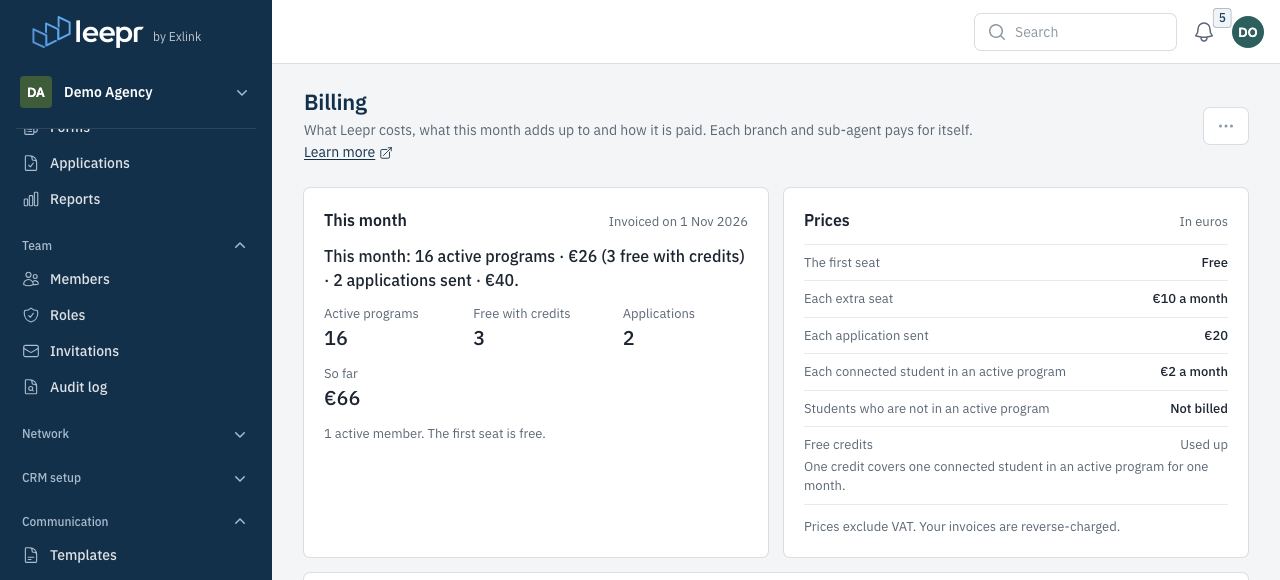
This article explains what Leepr charges for, how the launch offer, the three free credits and the three free applications work, who pays for branches and sub-agents, and how to manage your card, VAT number and invoices on Account → Billing.
The Billing page needs the permission Manage billing: the Owner role has it, and you can tick it on other roles in Team → Roles.
What is billed
| What | Price |
|---|---|
| The first seat | Free, with every feature |
| Each extra seat | €15 / $15 a month; €10 / $10 for agencies that sign up before 1 January 2027 |
| Each application sent to a partner | €20 / $20, once; your first 3 are free. €15 / $15 from the 101st in a calendar year, €13 / $13 from the 501st |
| Each connected student in an active program | €2 / $2 a month. €1.50 / $1.50 from the 101st in a month, €1.25 / $1.25 from the 501st |
| Students who are not in an active program | Not billed |
Seats. Every active member after the first is a paid seat. A seat added during the month is charged for the rest of that month; removing or suspending a member does not refund the month already started. The seat price is set by the date your agency signs up and never changes while you are a customer: agencies that sign up before 1 January 2027 pay €10 / $10 a month for each extra seat, agencies that sign up from then €15 / $15.
Volume prices. Prices are graduated: the first 100 applications you send in a calendar year (UTC) cost €20 each, the next 400 €15 and every one after the 500th €13; connected students in an active program cost €2 a month for the first 100 in a month, €1.50 from the 101st and €1.25 from the 501st. The count is per paying organisation, so branches billed through you count toward your bands, and every application or program counts even when it was free or waived; only the price of a billed one changes. The Billing page shows how many you have sent this year and what the next one costs.
Applications. Your organisation’s first three applications are free (see Free credits and free applications). After those, each time you send your agency’s application to a partner, it is charged once, in the month you send it. The last step before sending shows the price (“This will be billed at €20.”) or that a free application will be used.
Connected students. A program is one student’s program at a partner you have connected. It is billed while your connection works and the program is active at the partner, by the partner’s own definition: for example applying, enrolled or attending. Cancelled, completed, dismissed and withdrawn programs are free. It is counted per program, so a student can be active in one program and not in another.
Each program is charged once per calendar month, the first time in that month it is connected and active:
- connecting on the 15th books that month;
- a program that turns active on the 20th books that month;
- disconnecting and reconnecting within a month books nothing twice;
- a program that ends during the month is not refunded.
Applying is an active status. An applicant you cancel at the partner stops counting from the next month.
Bringing students into Leepr and syncing them is free.
The launch offer
Agencies that create their Leepr account by 31 December 2026, 23:59 UTC, pay no Leepr charges for two months: extra seats, applications to partners and connected students in an active program are free from the day you sign up until the end of the second calendar month after the month you sign up in. Sign up on 15 November and you pay nothing through 31 January; your first invoice is on 1 February.
- Your free credits and free applications are not used during the offer; they cover your first charges after it ends.
- Your first invoice after the offer is the regular monthly one, on the 1st.
- A card is still needed before you connect a partner, send an application or add a second member, even though nothing is charged during the offer.
- Fees from services you connect, such as Stripe or Twilio, are not Leepr charges and still apply.
The full rules are in the launch offer terms.
Free credits and free applications
Every organisation that pays for itself starts with 3 free credits, once. One credit covers one connected student in an active program for one month, and your first charges use them. Credits do not come back each month: once they are used, every active program is billed.
A branch starts with none: its connected programs use its payer’s credits, first come, together with the payer’s own. A sub-agent’s credits are its own, and its parent’s are never spent on it (Who pays for branches and sub-agents, below).
For example, you connect a partner where you have 400 students and 40 of them are in an active program. The first month costs 37 × €2 = €74, with the 3 credits used. Every month after, while they stay active, costs €80.
Every paying organisation also gets its first 3 applications free, once. A free application is used when the application is confirmed at the partner; after the third, each application is billed at €20 / $20.
The Prices card on the Billing page shows how many free credits and how many free applications you have left, or Used up. Our support team can add credits to an organisation; any change appears in your audit log.
Euros or dollars
Agencies whose billing country is in Europe pay in euros; everyone else pays in US dollars. The billing country is the country you chose when you created the organisation, and the currency cannot be changed later. A branch is billed in its payer’s currency.
Add a card
A card on file is needed before you connect a partner, send an application to a partner or invite a second member. Without one, you use Leepr on the free seat with every feature. In a branch, the payer’s card is the one that counts.
- Go to Account → Billing.
- If your agency is in the EU or the UK, add your VAT number first if you have not yet, and check that it shows Confirmed (see below). The card waits for it: until then the page, the partner connection and the application steps offer Add VAT number instead of Add a card.
- Select Add a card. A secure Stripe page opens.
- Enter the card and your billing address. Nothing is charged at this step.
- You return to Billing, where the status reads Active.
To replace the card later, open the ⋯ menu at the top of the page and select Update card. Manage billing opens the billing portal, where you change the billing email and address.
VAT numbers and reverse charge
Prices exclude VAT. Agencies in the EU and the UK give a VAT number before they add a card — at sign-up or later on Account → Billing — and Leepr checks it with VIES (EU) or HMRC (UK). Their invoices carry no VAT under the reverse charge: the invoice shows your number and “Reverse charge: VAT to be accounted for by the recipient.”
The number is checked again before each invoice. If the registry does not confirm it, new partner connections, applications and members wait until it is fixed. On the VAT number card, use Change VAT number to correct it, or Check again when the registry could not answer.
Agencies outside the EU and the UK are not charged VAT.
Your month, invoices and statements
The This month card adds up the month so far: active programs, how many were free with credits, applications sent, the total, your members and extra seats, and the date of the next invoice. Further down, Active programs this month splits the programs by partner and Applications this month lists each application with its price.
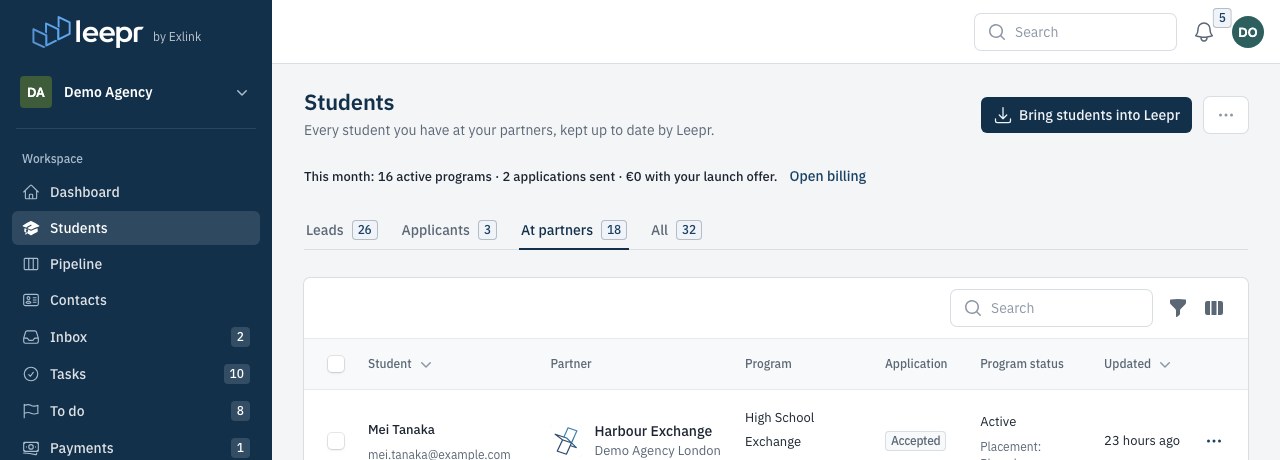
The same line appears above Workspace → Students (the Applicants, At partners and All views) and To do for members who manage billing, with an Open billing link. When you connect a partner, the connect wizard and the partner’s row on the Partners page show what its students cost this month.
You are invoiced on the 1st of each month. The invoice has a line for your extra seats, one line per application sent, and one line per connected partner for its active programs. If you pay for branches, their extra seats are counted in your seats line, and their applications and programs have lines of their own, each starting with the branch’s name. The Invoices card lists your invoices: Download PDF saves one, and Pay invoice pays one that is still open.
On the 1st, Leepr also emails a monthly statement to your billing email: for each partner, every program charged with the student, the program, its status and the price (or “Free”), then the applications sent and the totals. A month with no programs charged and no applications sent has no statement.
When connections pause
Without a card, partner connections do not work. They also pause when a payment fails or when the card is removed. When this happens to an organisation that pays for branches, the partner connections of those branches pause too; a branch never pauses on its own. Leepr emails your billing contact, and a banner on every page says what happened, for example: “Your last payment failed, so your partner connections are paused and nothing new is sent to partners.”
While connections are paused:
- syncing, details from the partner and the partner’s to-dos stop;
- you cannot send applications, bring students in, connect partners or add members;
- nothing is charged for the paused connections;
- what was already synced stays visible, and the Partners page shows Paused.
To resume, select Update card (or Add a card) on the Billing page. Open invoices are paid with the new card and every connection catches up with the partner, the branches’ included. In a branch, only the payer’s billing managers can do this: the banner names the payer and tells the branch’s members to ask them.
Billing never locks or deletes your leads, contacts, messages, forms or bookings.
One case makes members read-only: when the organisation has no card and more active members than paid seats, for example after the card was removed. Then only the free seat, usually the Owner, can make changes; the other members can read but not change anything until a card is on file.
Who pays for branches and sub-agents
A sub-agent pays for itself, with its own card, seats, programs, applications, invoices, 3 free credits and 3 free applications. Your organisation never pays for it.
A branch is billed through its payer: the nearest organisation above it that is not a branch, usually the organisation at the top of your group. The payer’s card covers the branch’s extra seats, connected programs and applications, which appear on the payer’s invoice. The branch uses the payer’s free credits and VAT number. Each organisation keeps its own free first seat, branches included.
A branch gets no launch offer or free applications of its own: while its payer’s launch offer runs, the branch’s charges are free too, and its applications draw on the payer’s free applications.
- In the payer, Account → Billing lists Branches you pay for: each branch’s members and extra seats, programs billed and applications sent this month, and their amount.
- In a branch, Account → Billing says “Billed through” the payer and shows what the branch uses, the prices and the payer’s credits left. There is no card, VAT number or invoice to manage there: those are the payer’s, managed by its billing managers.
The organisation directly above a branch or sub-agent can switch it with Make a branch or Make a sub-agent on Network → Branches & sub-agents:
- Make a branch: its unused free credits are forfeited, it gets one last invoice of its own for what it used before, and its own subscription ends with its current billing period; its open invoices stay its own. Its programs and applications go on the payer’s invoice from then on, its extra seats from the next billing run.
- Make a sub-agent: it pays for itself at once and gets no free credits. Its partner connections pause until its Owner adds a card.
An agency that joins your group as a branch moves its billing the same way, and its Owner agrees to it when accepting. A branch and its payer must be billed in the same currency. Details are in Branches and sub-agents.